


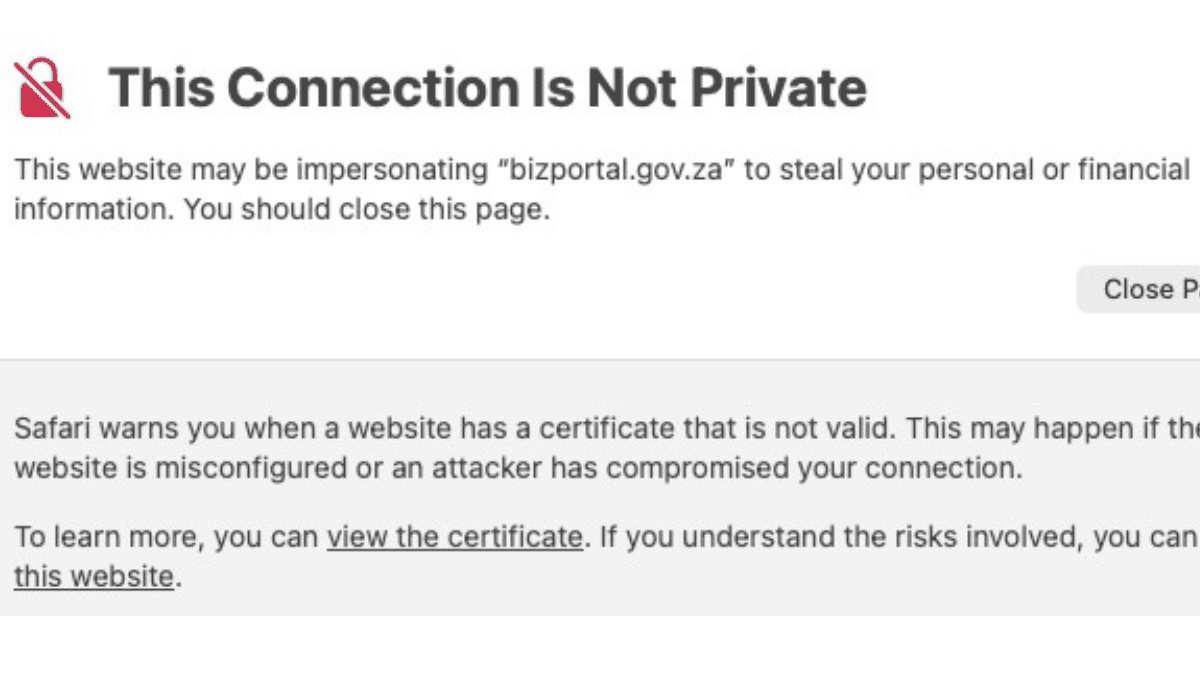
I was just trying to be a productive entrepreneur, managing some admin for one of my companies, when Safari decided to pull the handbrake and scream, “This Connection Is Not Private.”
That is a hell of a greeting when you’re trying to navigate a government-linked business platform.
The site in question is BizPortal, the digital bridge to the CIPC. When a browser tells you a site “may be impersonating bizportal.gov.za” and warns you against touching it with a ten-foot pole, your gut sinks. This is where we handle company registrations, director changes, and sensitive compliance data, so naturally it’s the last place you want to see a red flag.
But before you start panicking, after further testing, an important detail emerged: the issue appears to occur specifically in Safari, while Google Chrome loads the site without any issues.
What that tells us is this isn’t a hack or a digital heist but rather a classic case of the “Tech Gremlins” messing with SSL certificates.
The “Security” Language Barrier
Think of an SSL certificate as a digital ID card. When your browser knocks on a website’s door, it checks if the ID is legit, if it’s expired, and if the name on the card matches the person standing there.
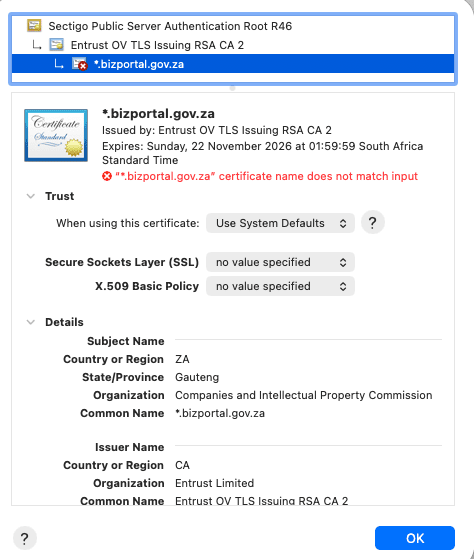
In this case, the ID looks fine. The certificate chain is solid, the authority is recognized, and it’s a valid wildcard for *.bizportal.gov.za.
So why is Safari throwing a tantrum then? What It’s flagging is a “certificate name mismatch.”
Basically, Safari is the strict bouncer at the door who thinks the name on the invite doesn’t perfectly match the ID presented. Chrome, on the other hand, is the chill guy who sees the name is close enough and lets the site through.

Chrome vs. Safari: The Validation War
Safari—especially on macOS—has always been the “safety first” kid in the class. It enforces tighter rules on how certificates are configured whereas Chrome is often more forgiving of slight configuration edge cases.
This usually boils down to:
- A messy redirect.
- A subdomain that wasn’t properly tucked into the certificate’s “Subject Alternative Name” (SAN).
- A load balancer in the background that hasn’t been updated to speak the same language as modern Apple devices.
It’s a common headache for large-scale platforms, but for a government service, it’s a massive “trust tax.”
This is Not a Drill (But it is a Mess)
To be clear: nothing I’ve seen suggests a breach, a phishing attack, or a malicious actor sitting in the middle. The infrastructure is most likely intact and it’s technically just a boring configuration error.
But for government managed IT systems, It’s a PR disaster.
Most South Africans aren’t digging through certificate chains or A/B testing their browsers. They see a giant warning page saying a government site is an impostor, and they bail.
We’ve spent a decade training people to trust these warnings because the internet is a digital minefield. When a legitimate, essential platform starts triggering those same alarms, we run into a “Boy Who Cried Wolf” scenario. If users get used to clicking “Proceed Anyway” on a government site, they’ll start doing it on actual phishing sites, too.
Confidence is the Real Currency
South Africa’s push toward a digital-first government is vital. Infact just this week Minister of Home Affairs Leon Schreiber and his department published draft regulations for a digital ID system. As a country, we need these systems to work, but more importantly we need them to be the efficient, frictionless tools they were promised to be.
Look, digital adoption lives and dies on trust.
While the technical explanation for this glitch may be a footnote, the feeling of being told your own government’s site might be a scam is what sticks in peoples minds. In a country already hyper-aware of digital fraud and identity theft, our public platforms can’t afford to be ambiguous.
We can’t afford to let our digital trust grid go dark because someone forgot to check the SSL fine print. Fix the certificate, fix the trust. It’s as simple as that.


