


Let’s talk security for a bit. Not the armed response kind, but the kind that keeps your email, social media, and cloud accounts safe from hackers.
Passwords are trash. We all know it. But in 2025, with phishing attacks smarter than ever and data leaks happening faster than Donald Trump’s executive orders, slapping on two-factor authentication (2FA) is no longer optional — it’s basic digital hygiene.
And in the crowded world of 2FA apps, Google Authenticator still holds its ground as one of the simplest, most reliable tools out there. No complication, no pesky ads. Just solid, offline-first security.
If you’ve seen two-factor authentication — or 2FA floating around online and weren’t sure what the fuss was about, lets make it clear.
What Is Two-Factor Authentication (2FA), and Why Should You Care?
Think of 2FA like a second lock on your front door. Your password is the first lock, but let’s be honest, most people use the same password across multiple accounts, or something like “P@ssw0rd123” that a hacker could guess in their sleep.
2FA adds a second step — usually a short, one-time code that only you can access, to make sure it’s really you logging in. Even if someone steals your password, they still can’t get into your account without that extra code.
It’s the digital version of a security gate with your name on it.
Google Authenticator: 2FA Without the Nonsense
Google Authenticator uses what’s called a Time-based One-Time Password (TOTP) system — basically a six-digit code that refreshes every 30 seconds. It runs locally on your phone, which means no internet, no SIM card, no problem. You get the code; the app you’re logging into checks it; and you’re in.
Why’s that better than getting codes via SMS? Because SIM-swapping fraud is a thing, and criminals are smart. Yes, SMS 2FA is better than nothing, but TOTP-based apps like Google Authenticator are way harder to mess with.
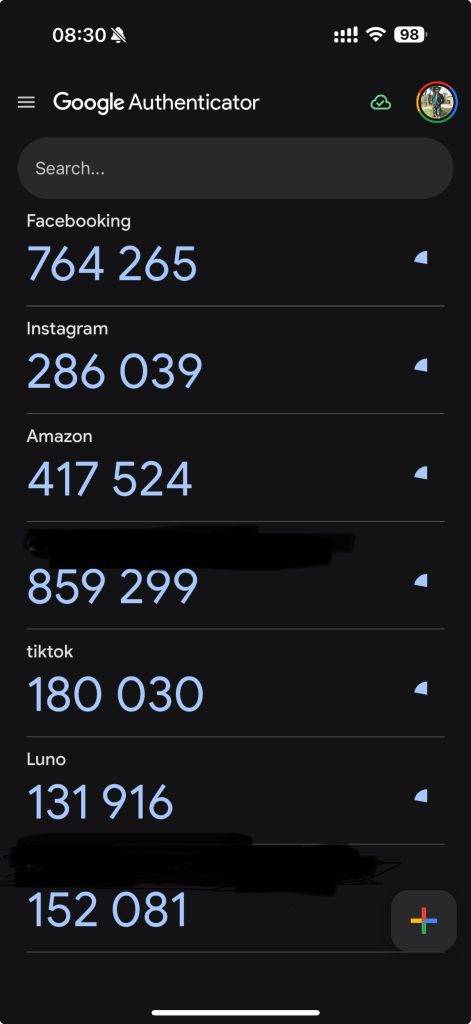
It Works Offline. Always Has. Always Will.
One of the best things about Google Authenticator? It just works. No internet needed. If you’re on a dodgy connection in rural Limpopo or sitting through a power outage in Midrand, your 2FA codes still show up, right on schedule. This makes it a must-have for folks in areas where mobile service isn’t always a guarantee — which, let’s be honest, is most of South Africa some days.
It Plays Nice With (Almost) Everything
Whether you’re securing your email, social media, or cloud storage, Google Authenticator supports them all. It’s not just a Google product thing — it’s a “secure everything” thing. You can manage dozens of accounts in one place without needing ten different apps.
New Sync Feature = Convenience (But Also Risk)
In 2023, Google added account sync, meaning your 2FA codes can now back up to your Google Account. If you lose your phone, you can restore your codes when you sign in on a new one.
Sounds great, right?
Yes… but also no.
If someone gets into your Google Account, they could potentially get access to your backed-up 2FA codes. So while sync is super handy for phone upgrades or losses, you need to lock down your Google Account like Fort Knox. Think long passwords, strong 2FA, and no reusing login info across sites.
What It Doesn’t Do (Yet)
Here’s what Google Authenticator still doesn’t offer and might be a dealbreaker for some:
• No biometric lock-in: If someone unlocks your phone, they can open the app and see your codes.
• No end-to-end encryption for synced data: Which means, technically, Google could access your codes if they wanted to. They say they don’t, ehhm, but still.
It’s not a red flag, but it’s not nothing either.
So, How Do You Use It Right?
If you’re going to roll with Google Authenticator, here’s how to do it properly:
• Lock your phone: Strong PINs, biometrics, whatever — just don’t leave it wide open.
• Keep the app updated: Every update improves security. Don’t slack.
• Treat sync like a loaded gun: Only enable it if your Google Account is locked down.
• Don’t share codes. Ever. Phishing scams are sneaky — if someone asks for your 2FA code, that’s a scam 100% of the time.
Final Verdict: Still One of the Best Tools in the Security Toolbox
Google Authenticator is like that old friend who always shows up on time, doesn’t make a fuss, and never forgets your birthday. It’s not flashy, it’s it’s just solid, reliable security for the part of your digital life that really matters.
It’s not perfect. But for anyone serious about locking down their logins without jumping through unnecessary hoops, it’s still one of the best tools around.
Especially when the alternative is trusting your digital security to a six-digit SMS code bouncing through five cell towers or worse, a store consultant who can process a SIM swap in 10 minutes with barely any verification.
I know what I’d rather have! How about you?
