Close Menu

    Subscribe to our newsletter

    Get the latest Geekhub updates.

    Friday, April 17
    Geekhub
    Facebook X (Twitter) Instagram
    • Home
    • About us
    • News
    • Technology

      This New AI Tutor in South Africa Is Teaching Students How to Think, Not Cheat

      RAZOR13 April 2026

      US Officials Quietly Warn Banks: The Next Big Cyber Risk Might Be AI Itself

      13 April 2026

      Standard Bank Data Breach Triggers Regulator Probe — Here’s What You Need to Know

      13 April 2026

      Apple’s Foldable iPhone Faces Engineering Delays Ahead of Expected 2026 Launch

      7 April 2026

      MTN Launches New Month-to-Month Packages with 20GB for R1 Promo

      31 March 2026
    • Opinion

      The Best Marketing Sometimes Starts With a Dead End

      26 March 2026

      Nostalgia Isn’t a Business Plan: The Truth About 90s Reboots

      11 February 2026

      Convenience vs connection: The Problem With “Smart” Technology

      11 February 2026

      The Uncomfortable Truth Told By Movie Villains

      10 February 2026

      Valentine’s Day: Commercial Fluff Without The Love

      4 February 2026
    • Movies & TV

      The Thomas Crown Affair: It’s Not Just A Heist

      16 April 2026

      Disclosure Day: Spielberg Asks What If Aliens Were Already Here?

      16 April 2026

       Dune: Part Three Isn’t About Destiny Anymore… It’s About Consequences

      15 April 2026

      Oh Peanuts… Snoopy Unleashed First Look Teases a Big City Adventure

      15 April 2026

      Jumanji: Open World Is Flipping the Game Into Reality

      14 April 2026
    • Hardware

      Apple’s Foldable iPhone Faces Engineering Delays Ahead of Expected 2026 Launch

      7 April 2026

      Samsung Might’ve Just Broken Apple’s Sneakiest Lock-In Trick

      30 March 2026

      The smartphone wars in South Africa aren’t really about phones anymore

      17 March 2026

      Apple MacBook Neo: You Can Now Buy a New MacBook for R12,000… But Is It Worth It?

      11 March 2026

      Samsung Galaxy S26 series lands in South Africa and its all very familiar

      25 February 2026
    • Get In Touch
    Geekhub
    Home » Google Authenticator:The easiest way to secure your account logins
    Tech Tips Tuesday

    Google Authenticator:The easiest way to secure your account logins

    Akhram MohamedBy Akhram Mohamed6 May 2025No Comments5 Mins Read
    Facebook Twitter LinkedIn Email WhatsApp Copy Link

    Let’s talk security for a bit. Not the armed response kind, but the kind that keeps your email, social media, and cloud accounts safe from hackers. 

    Passwords are trash. We all know it. But in 2025, with phishing attacks smarter than ever and data leaks happening faster than Donald Trump’s executive orders, slapping on two-factor authentication (2FA) is no longer optional — it’s basic digital hygiene. 

    And in the crowded world of 2FA apps, Google Authenticator still holds its ground as one of the simplest, most reliable tools out there. No complication, no pesky ads. Just solid, offline-first security. 

    If you’ve seen two-factor authentication — or 2FA floating around online and weren’t sure what the fuss was about, lets make it clear.

    What Is Two-Factor Authentication (2FA), and Why Should You Care?

    Think of 2FA like a second lock on your front door. Your password is the first lock,  but let’s be honest, most people use the same password across multiple accounts, or something like “P@ssw0rd123” that a hacker could guess in their sleep.

    2FA adds a second step — usually a short, one-time code that only you can access, to make sure it’s really you logging in. Even if someone steals your password, they still can’t get into your account without that extra code.

    It’s the digital version of a security gate with your name on it.

    Google Authenticator: 2FA Without the Nonsense

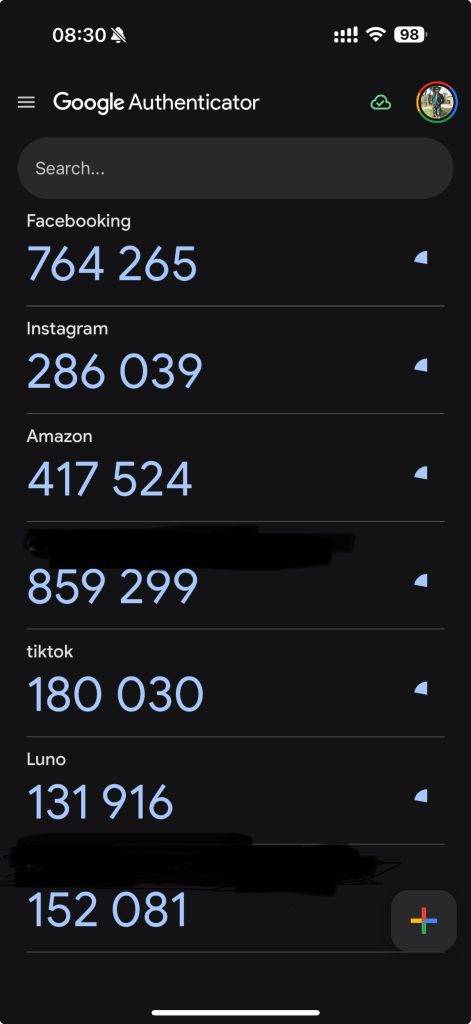
    Google Authenticator uses what’s called a Time-based One-Time Password (TOTP) system — basically a six-digit code that refreshes every 30 seconds. It runs locally on your phone, which means no internet, no SIM card, no problem. You get the code; the app you’re logging into checks it; and you’re in.

    Why’s that better than getting codes via SMS? Because SIM-swapping fraud is a thing, and criminals are smart. Yes, SMS 2FA is better than nothing, but TOTP-based apps like Google Authenticator are way harder to mess with.
    It Works Offline. Always Has. Always Will.

    One of the best things about Google Authenticator? It just works. No internet needed. If you’re on a dodgy connection in rural Limpopo or sitting through a power outage in Midrand, your 2FA codes still show up, right on schedule. This makes it a must-have for folks in areas where mobile service isn’t always a guarantee — which, let’s be honest, is most of South Africa some days.

    It Plays Nice With (Almost) Everything

    Whether you’re securing your email, social media, or cloud storage, Google Authenticator supports them all. It’s not just a Google product thing — it’s a “secure everything” thing. You can manage dozens of accounts in one place without needing ten different apps. 

    New Sync Feature = Convenience (But Also Risk)

    In 2023, Google added account sync, meaning your 2FA codes can now back up to your Google Account. If you lose your phone, you can restore your codes when you sign in on a new one.

    Sounds great, right?

    Yes… but also no.

    If someone gets into your Google Account, they could potentially get access to your backed-up 2FA codes. So while sync is super handy for phone upgrades or losses, you need to lock down your Google Account like Fort Knox. Think long passwords, strong 2FA, and no reusing login info across sites.

    What It Doesn’t Do (Yet)

    Here’s what Google Authenticator still doesn’t offer and might be a dealbreaker for some:

    • No biometric lock-in: If someone unlocks your phone, they can open the app and see your codes.

    • No end-to-end encryption for synced data: Which means, technically, Google could access your codes if they wanted to. They say they don’t, ehhm, but still.

    It’s not a red flag, but it’s not nothing either.

    So, How Do You Use It Right?

    If you’re going to roll with Google Authenticator, here’s how to do it properly:

    • Lock your phone: Strong PINs, biometrics, whatever — just don’t leave it wide open.

    • Keep the app updated: Every update improves security. Don’t slack.

    • Treat sync like a loaded gun: Only enable it if your Google Account is locked down.

    • Don’t share codes. Ever. Phishing scams are sneaky — if someone asks for your 2FA code, that’s a scam 100% of the time.

    Final Verdict: Still One of the Best Tools in the Security Toolbox

    Google Authenticator is like that old friend who always shows up on time, doesn’t make a fuss, and never forgets your birthday. It’s not flashy, it’s it’s just solid, reliable security for the part of your digital life that really matters.

    It’s not perfect. But for anyone serious about locking down their logins without jumping through unnecessary hoops, it’s still one of the best tools around.

    Especially when the alternative is trusting your digital security to a six-digit SMS code bouncing through five cell towers or worse, a store consultant who can process a SIM swap in 10 minutes with barely any verification.

    I know what I’d rather have! How about you?

    2FA Google Authenticator Tech Tips
    Follow For The Latest Updates Follow For The Latest Updates
    Share. Facebook Twitter LinkedIn WhatsApp
    Akhram Mohamed
    • Website
    • LinkedIn

    Akhram Mohamed is the Editor of Geekhub.co.za and a longtime tech insider who’s spent 20+ years testing, launching, and talking about consumer gadgets. Formerly a VP at Huawei, he now writes with a critical eye and a deep love for tech that actually makes life better. When he’s not breaking down the latest devices, he’s gaming, building businesses, simplifying strategy, or podcasting about real-world leadership. Expect honest takes, sharp insights, and the occasional dad joke.

    Related Posts

    This New AI Tutor in South Africa Is Teaching Students How to Think, Not Cheat

    RAZOR13 April 2026

    Apple’s Foldable iPhone Faces Engineering Delays Ahead of Expected 2026 Launch

    7 April 2026

    MTN Launches New Month-to-Month Packages with 20GB for R1 Promo

    31 March 2026
    Opinion

    The Best Marketing Sometimes Starts With a Dead End

    26 March 2026

    Nostalgia Isn’t a Business Plan: The Truth About 90s Reboots

    11 February 2026

    Convenience vs connection: The Problem With “Smart” Technology

    11 February 2026

    The Uncomfortable Truth Told By Movie Villains

    10 February 2026
    Don't Miss
    Movies & TV

    The Thomas Crown Affair: It’s Not Just A Heist

    Shana Mohamed16 April 2026

    Fresh off his Oscar win, Michael B. Jordan brings a sleek, dangerous edge to The Thomas Crown Affair, revealed in first footage at CinemaCon 2026.

    Disclosure Day: Spielberg Asks What If Aliens Were Already Here?

    16 April 2026

     Dune: Part Three Isn’t About Destiny Anymore… It’s About Consequences

    15 April 2026

    Oh Peanuts… Snoopy Unleashed First Look Teases a Big City Adventure

    15 April 2026
    About Us
    About Us

    Geekhub was not created as a business and we are not journalists, we are just a bunch of geeks that love what we do and we share our collective passion with you, our valued readers.

    Contact: +27 83 346 2178

    Facebook X (Twitter) LinkedIn
    Our Picks

    The Thomas Crown Affair: It’s Not Just A Heist

    16 April 2026

    Disclosure Day: Spielberg Asks What If Aliens Were Already Here?

    16 April 2026

     Dune: Part Three Isn’t About Destiny Anymore… It’s About Consequences

    15 April 2026
    Most Popular

    AI and The Cost Of Convenience: What are we really giving up?

    27 November 2025

    OPPO Reno 12Pro 5G- A beautiful Mid-range Contender

    14 August 2024

    Huawei’s AI Chip Challenge: A David vs. Goliath Showdown?

    15 August 2024
    • Home
    • Terms of Service
    • Geekhub Editorial Policy
    • Privacy Policy
    • Get In Touch
    © 2026 Geekhub.co.za All Rights Reserved!

    Type above and press Enter to search. Press Esc to cancel.